Background Manager For Hyprpaper
I have an old laptop that’s 10+ years old. It’s still very functional except the hinges broke, the screen was removed, and the hard drive had to be replaced with an even older one due to prepubescent gamer rage. I can’t let a good piece of compute go to waste though, so a few years back I installed Arch Linux on it and sort of let it just sit there. It used Awesome as the window manager and I would use it occasionally for some asynchronous automation tasks. However, with the “recent” hype around Hyprland, I decided to update my configurations. While updating, I realized that there wasn’t really any wallpaper GUI application (besides 1 Python repository), so I decided to build my own. I was also learning Haskell around the same time, so it was a good excuse to learn the language and explore the Haskell ecosystem.
Features
This application should be dead simple. All it needs to do is show available wallpapers and update the current wallpaper to the one the user wants. I decided to have two main screens: the wallpaper screen that displays images and allows the user to choose an active background, and the settings screen where they can add different directories to search for wallpapers.
Gallery View
To view all the available wallpapers, I decided on a gallery view based on a simple masonry layout. Typically wallpaper aspect ratios would be 16x9, but sometimes I have different aspect ratios because I set memes as my wallpaper (hopefully this isn’t just a me thing). As such, a masonry layout is especially nice since it compacts the entire view with even gaps between all images.
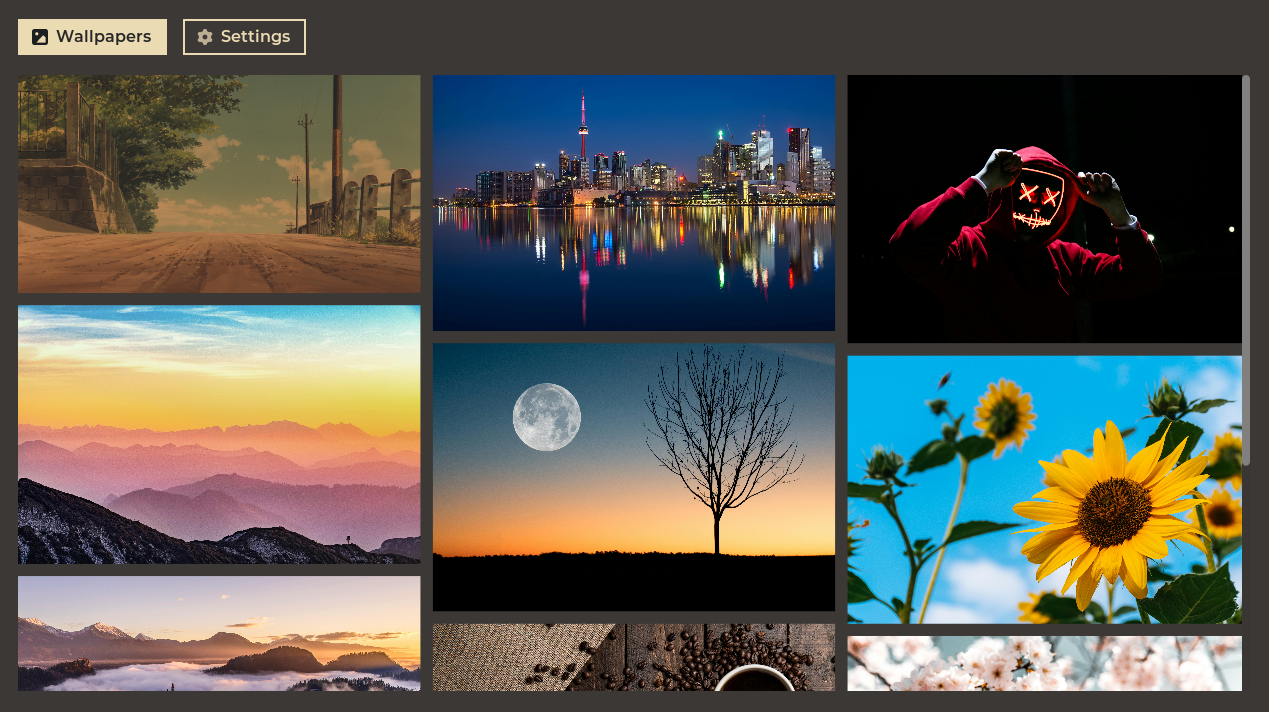
When a wallpaper is clicked, it updates the current background and also updates the Hyprpaper configuration file for persistence across sessions. Under the hood, the on-click event triggers an IPC call as well as an external configuration parser.
Directory Discovery
I personally have all my backgrounds stored in the ’~/backgrounds’ path, but I know that others probably have different path(s). For that reason, I added a settings option to be able to add and remove different directories that searches and loads the backgrounds. To add a directory, you can simply click a button that opens a file dialog. Then upon adding the folder, the program reparses all directories, filters by images and loads it into the gallery view. To delete a directory, you can just click on the path displayed. For persistence, an external text file was used to store the list of directories.

Challenges
Oh boy, where do I even start. Even though this was a dead simple project, there were still a lot of challenges mainly regarding the Haskell ecosystem (and some skill issue on my part). Specifically there were 3 main issues I encountered: Gtk4 bindings, dynamic image sizing, and Docker packaging.
Gtk4 Bindings
To build a GUI, you need a graphics library. A popular cross platform solution built in C is Gtk4. Luckily for me, there’s a Haskell package that has bindings for the C function calls which allowed me to start building. Unluckily for me, the bindings kind of suck. Disregarding the native Gtk issues of inflexible UI, shitty CSS support, and the massive dick that is the ScrolledWindow widget, the bindings were somehow worse. Updated documentation didn’t exist which meant I had to rely on my LSP for accurate function signatures. I also had to create custom bindings for font configurations because those didn’t exist for some reason. What really broke the camels back though was how important signals like widget size, which clearly exist in the Gtk4 documentation, just didn’t have corresponding bindings.
Now I could’ve sucked it up and Frankensteined a solution with custom binds and weird lifetime interrupts. In fact, I had most of the essential features done at this point, but I ultimately made the difficult decision to rewrite the entire program in Monomer. Monomer is a Haskell package for building GUIs based on the ELM architecture with the only dependencies being SDL2 and GLEW. It took some time to get used to how things like state were managed, but overall it was a better developing experience and it has better documentation (kind of). That being said, it did have some quirks.
Dynamic Image Sizing
What do you think this piece of Haskell/Monomer code does?
imageButton (p, ar) =
    box_
        [onClick (SetWallpaper p)]
        ( image_ (pack p) [fitWidth]
        )
Even if you don’t know Haskell or Monomer at all, you would probably be able to guess that it scales an image to fit the width of the container. Here’s what multiple images look like in a column view:
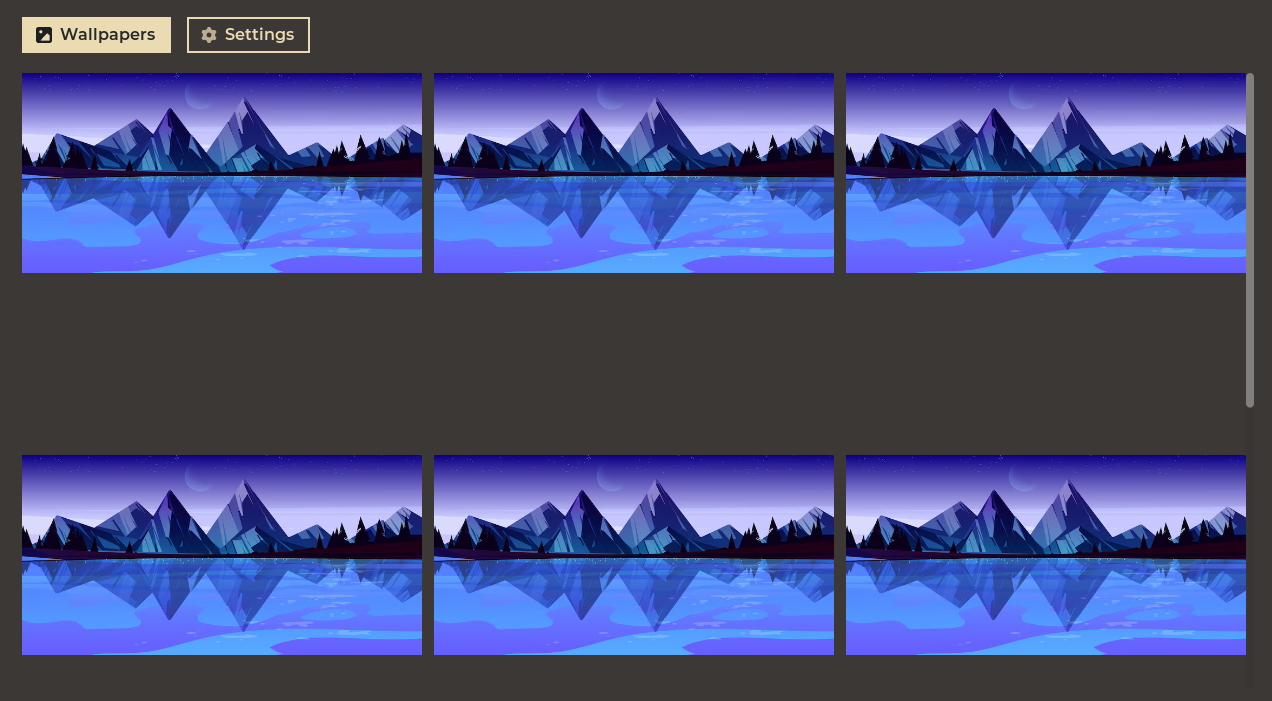
Notice anything weird? Yeah why the hell are there such large vertical gaps between the images? Is there additional padding or margin that I added? Nope, what’s happening here is that while the image scales down to fit the width, the image height still retains the original height value from its resolution. Here’s a bit of an illustration:
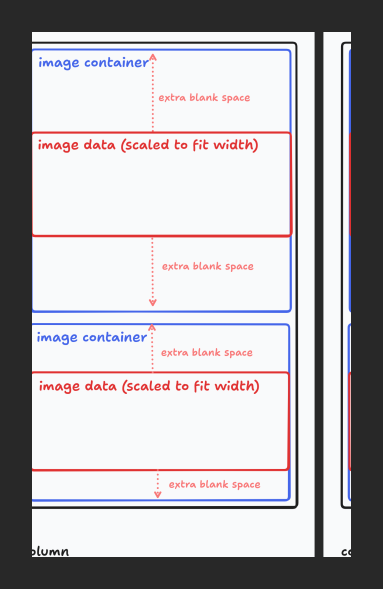
Luckily solving this issue isn’t that big of a deal. Just needed to build a custom image dimension parser (couldn’t find a plug-and-play package for it), calculate column width in gallery view, and manually resize the image based on the aspect ratio.
imageButton (p, ar) =
    box_
        [onClick (SetWallpaper p)]
        ( image_ (pack p) [fitWidth]
            `styleBasic` [width columnWidth, height $ columnWidth * ar]
        )
Docker Packaging
To solve the distribution issue, I thought Docker might be a serviceable solution since I didn’t want to release official packages to multiple distros and also the user wouldn’t need to install GHC on the host machine. I understood that there might be some performance hits when it came to installation and that the image size might be a little bloated, but the main issues were in regards to convenience.
Since containers are designed to be an isolated environment, interacting with the host was non-trivial. I needed to be able to access certain files, environment variables, and programs which required me to pass in a bunch of arguments and flags to the run command. There were additional issues with detecting X11 versus Wayland displays, attempting to sync Hyprland sessions and overall it became an absolute hassle trying to figure out why things weren’t working.
Currently I don’t have a great solution to this problem. My best idea is to stick with Docker but instead of running it through the container, simply build it within the container, then run a script to install it after the binary is created. This would solve the issues of having to mount volumes and transfer environment variables, but I would also have to consider multiple edge cases with the host machine. For now though, people are going to have to suck it up and have Haskell installed to be able to build and run the application.
Future Development
This wouldn’t be a bonafide personal project without the mandatory “future development” section that I will 100%, most definitely, with all my power add to the application. Here are a couple smaller initiatives:
- Add different wallpaper modes
- Support for multiple monitors
- Add “current wallpaper” UI indicator
- Carousel script to switch between multiple wallpapers
Not sure if I’m going to rewrite the app in a more comfortable language for me, but if I do stick with Haskell and Monomer, I want to update how the images are loaded. One of the quirks of Monomer is that it’s run on one main thread, which means that it might result in some lag due to loading everything sequentially. There are ways to add asynchronous operations like with Tasks. Specifically for images, there’s imageMem_ which loads the image from memory. While this can be very expensive since image resolution is presumably high, I personally think that unblocking the main thread is worth it. Also adding a basic cache for a snapshot of the lower resolution version will probably help with the memory usage. I would’ve already added this feature in, but it’s not that simple since (1) I need to convert encoded images to a 4 byte RGBA ByteString and (2) I need to scale the image ByteString to fit the container width.
Another idea that I had was making a more advanced masonry layout algorithm. Currently the layout does a linear allocation of each image, but I want to precalculate ideal image formation so that the scroll window height is minimized. Also I thought it would be cool to add cross-column layouts for horizontal dominant images since that would add some visual flair.
Conclusion
It was cool working with Haskell, not going to ever do it again though. Just kidding, it was definitely difficult having to learn how to think functionally, but I just need some more experience with it.
Thanks for reading. Cya 👋.